AI Bookkeeping for Small Business: What You Need to Know

It’s 9:47 p.m., your customers are asleep, your staff is home, but you’re still staring at a spreadsheet trying to figure out where the money went.
You have invoices to record, receipts to organize, transactions to categorize, and bank statements to reconcile. Tomorrow, you’ll wake up and do it all over again. The frustrating part? You didn’t start your business to spend your evenings doing bookkeeping.
For many small business owners, bookkeeping is one of those jobs that quietly takes over. At first, managing a few transactions manually doesn’t seem like a big deal. But as sales increase, expenses pile up, and the business grows, keeping accurate financial records becomes harder and small mistakes can turn into expensive problems.
That’s where AI bookkeeping for small businesses is changing the game.
Modern bookkeeping software can use artificial intelligence and automation to categorize transactions, process financial data, identify patterns, reduce repetitive work, and help business owners keep their books up to date with less manual effort. Instead of constantly playing catch-up with your finances, you can spend more time understanding what the numbers are telling you and making better business decisions.
What Can AI Actually Do for a Small Business?
For a small business owner, “AI-powered bookkeeping” can sound like another piece of technology promising to change everything. But what does it actually do when you log into your bookkeeping software?
The answer is simpler and more practical, than you might think.
AI isn’t necessarily replacing your accountant or making every financial decision for you. Its biggest value is taking care of the repetitive, time-consuming work that keeps you buried in your books.
Here are some of the things AI can actually help with.
a. Automate Transaction Categorization
Every time money moves through your business, it needs to be recorded and categorized correctly. A payment to a supplier, for example, might need to be classified as an operating expense, while a customer payment needs to be recorded as revenue.
Doing this manually for hundreds of transactions can take hours.
AI-powered bookkeeping software can analyze transaction descriptions, amounts, previous categorization patterns, and other available information to suggest how transactions should be categorized. Over time, the system can become better at recognizing recurring transactions and reducing the amount of manual input required.
You still need to review important transactions, but instead of categorizing everything from scratch, you can focus your attention on exceptions and corrections.
b. Reduce Manual Data Entry
Manual data entry is one of the least exciting parts of running a business and one of the easiest places for mistakes to creep in.
AI and automation can help capture and organize financial information from connected accounts, invoices, receipts, and other sources. Rather than repeatedly typing the same information into spreadsheets or bookkeeping software, more of the process can happen automatically.
That means fewer hours spent copying numbers and more time spent actually running the business.
c. Help With Bank Reconciliation
Reconciliation means comparing the transactions recorded in your books with the transactions appearing in your bank account and making sure they agree.
For a business with hundreds of transactions every month, this can become tedious quickly.
AI-powered systems can help match transactions, identify potential duplicates, and flag items that don’t appear to match. This doesn’t eliminate the need for review, but it can make the reconciliation process significantly more efficient.
d. Identify Unusual Transactions
AI can also help spot transactions that don’t look like your normal financial activity.
For example, the software might flag:
- An unusually large expense
- A duplicate transaction
- An unexpected payment
- A transaction that doesn’t fit an established pattern
- A potentially miscategorized expense
This can give you another layer of visibility into your books and help you catch issues earlier.
e. Organize Business Expenses
Keeping track of expenses becomes increasingly difficult as a business grows.
AI bookkeeping tools can help organize expenses into categories and make it easier to see where your money is going. Instead of scrolling through bank statements trying to understand your spending, you can use organized financial data to identify major expense areas and recurring costs.
That information can become particularly useful when you’re looking for ways to improve cash flow or reduce unnecessary spending.
f. Generate Financial Reports
Financial reports turn individual transactions into information you can actually use.
Depending on the software, AI and automation can help generate or maintain reports such as:
- Profit and loss statements
- Balance sheets
- Cash flow reports
- Expense summaries
- Revenue reports
The real benefit isn’t simply having a report. It’s being able to access reliable financial information without spending hours manually preparing it.
g. Provide Financial Insights
This is where AI bookkeeping starts moving beyond simply recording transactions.
Some AI-powered systems can analyze financial data and surface patterns or insights that might otherwise take time to discover. For example, they may help identify changes in spending, unusual expenses, revenue trends, or other patterns in your financial activity.
Think of it as having another set of eyes looking through your numbers.
However, there’s an important distinction: AI can highlight patterns and provide insights, but that doesn’t mean every recommendation should be accepted without question. Business owners, bookkeepers, and accountants still need to apply context and judgment.
How to Choose AI Bookkeeping Software for Your Small Business
Choosing bookkeeping software used to be mostly about finding a place to record income and expenses. Today, there are far more options—and the real question is no longer “Does this software do bookkeeping?” but “How much of the bookkeeping can this software take off my plate?”
For a small business owner, the right AI bookkeeping software should do more than store your financial records. It should help you automate routine tasks, keep your books organized, give you a clearer picture of your finances, and make bookkeeping easier as your business grows.
Here are the most important things to consider before choosing a solution.
1. Look for Meaningful Automation
The biggest advantage of AI bookkeeping is automation. But not every platform offers the same level of it.
Look for software that can help automate repetitive tasks such as transaction categorization, data entry, reconciliation, expense tracking, and financial reporting.
The goal isn’t simply to have AI somewhere in the product description. The goal is to spend less time doing bookkeeping manually.
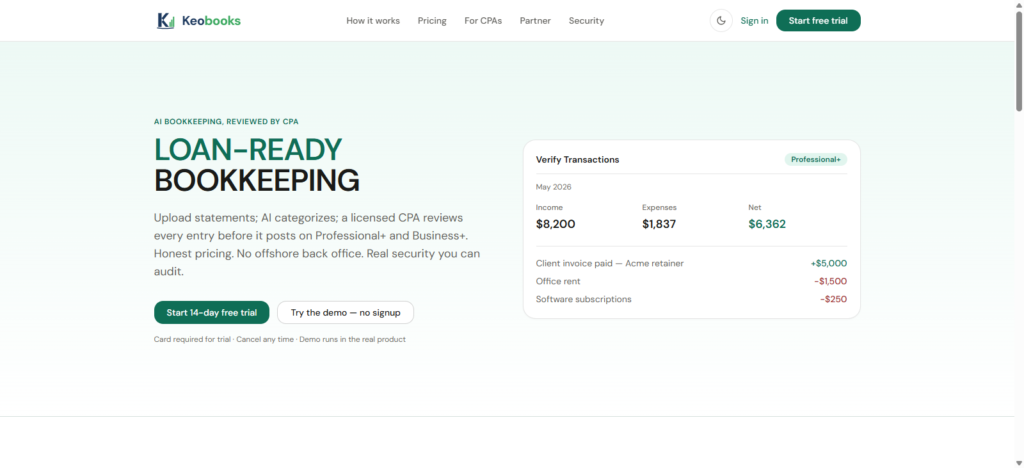
With KEOBOOKs, automation is built around making everyday financial management simpler, so you can spend less time sorting through transactions and more time running your business.
2. Make Sure It Connects to Your Financial Accounts
Imagine having to manually enter every bank transaction into your bookkeeping system.
For a business with hundreds of transactions, that can quickly become hours of unnecessary work and every manual entry creates another opportunity for an error.
A good bookkeeping platform should make it easy to connect your relevant financial accounts and bring transactions into your bookkeeping workflow.
This gives you a more current view of your finances without constantly moving information between spreadsheets, bank statements, and accounting software.
3. Pay Attention to Transaction Categorization
Categorizing transactions correctly is one of the repetitive parts of bookkeeping that can consume a significant amount of time.
AI-powered bookkeeping software can help identify patterns in your transactions and suggest appropriate categories based on your financial activity.
However, you should still be able to review and correct AI-generated suggestions. Your business isn’t identical to everyone else’s, and good bookkeeping software should give you control over your financial records rather than asking you to blindly trust automation.
4. Look for Easy Reconciliation
Bank reconciliation can become a tedious task when you’re doing everything manually.
Your bookkeeping software should help you match transactions and identify discrepancies so that you can quickly see whether your records correspond with your actual bank activity.
The easier this process is, the less likely bookkeeping becomes a task you keep postponing until the end of the month—or worse, until tax season.
5. Choose Software That Gives You Useful Financial Reports
Bookkeeping isn’t just about recording what happened.
The real value comes from understanding what those numbers mean for your business.
At a minimum, look for access to useful reports that help you understand:
- Revenue
- Expenses
- Profit and loss
- Cash flow
- Outstanding transactions
- Overall financial performance
With the right software, you shouldn’t need to be an accountant just to figure out whether your business is making money.
KEOBOOKs helps turn your bookkeeping data into information you can actually use to understand and manage your business.
6. Don’t Sacrifice Simplicity for Features
A bookkeeping platform can have dozens of features and still be a terrible choice if you can’t figure out how to use it.
Small business owners don’t necessarily need the most complicated accounting system available. They need a system that makes financial management easier.
Before choosing software, ask yourself:
- Can I understand the dashboard?
- Can I quickly find the information I need?
- Is it easy to record and review transactions?
- Can I manage my books without constantly needing technical help?
- Will my team or accountant be able to use it easily?
The best bookkeeping software is often the one you’ll actually use consistently.
7. Consider How the Software Will Scale With You
You may only have a few transactions today. That doesn’t mean you’ll have the same workload next year.
As your business grows, you’ll potentially deal with more customers, invoices, expenses, employees, bank transactions, and financial reporting.
Choosing software that can grow alongside your business means you won’t have to rebuild your bookkeeping system every time your business reaches a new stage.
8. Look Beyond the Price Tag
Price matters, especially for small businesses. But choosing bookkeeping software based solely on the cheapest subscription can be a costly mistake.
Instead, consider the total value you’re getting.
If a slightly more capable platform saves you several hours every month, reduces repetitive work, improves visibility into your finances, and makes it easier to stay organized, that time and efficiency can be worth far more than the difference in subscription price.
Think of bookkeeping software as a tool for buying back your time, not simply another monthly expense.
9. Make Security and Data Protection a Priority
Your bookkeeping system contains some of your business’s most important information.
Before signing up, consider how the platform handles your financial data, account access, authentication, backups, and permissions.
You want the convenience of automation without compromising control over sensitive business information.
10. Choose a Platform Built for the Way Small Businesses Actually Work
Ultimately, the best AI bookkeeping software isn’t necessarily the one with the longest feature list.
It’s the one that helps you answer three important questions:
Are my books organized?
Do I understand my financial position?
Am I spending less time on bookkeeping than I was before?
That’s the thinking behind KEOBOOKs. Instead of making bookkeeping another complicated system you have to learn and maintain, KEOBOOKs is designed to help small businesses simplify their financial management and reduce the burden of repetitive bookkeeping work.
Because your business has enough things demanding your attention.
Your bookkeeping software should give you time back, not take more of it.
Ready to make bookkeeping simpler? Explore KEOBOOKs and see how easier financial management can be.