What to Look for in AI Bookkeeping Software

Bookkeeping has always been one of those jobs that quietly consumes a small business owner’s time.
A transaction comes in. Someone has to categorize it. A receipt needs to be attached. A bank account needs to be reconciled. An invoice needs to be matched to a payment. Then, at the end of the month, someone has to make sure everything actually makes sense.
For years, bookkeeping software helped businesses organize this work. Now, AI bookkeeping software is changing how much of that work can be automated.
But there’s an important distinction: not every accounting platform that mentions “AI” is actually giving you meaningful AI-powered bookkeeping.
Some tools use AI to answer questions about your financial data. Others can categorize transactions, extract information from receipts, suggest journal entries, or help with reconciliation. The best solutions combine automation with the controls and human oversight necessary to keep financial records trustworthy.
That makes choosing the right AI bookkeeping software for small business more complicated than simply finding the platform with the longest list of AI features.
The real question is:
Can the software reliably reduce your bookkeeping workload without sacrificing accuracy, visibility, or control?
Here’s what to look for.
What Is AI Bookkeeping Software?
AI bookkeeping software uses artificial intelligence and automation to assist with accounting and bookkeeping tasks that traditionally require manual work.
Depending on the platform, AI can help with:
- Transaction categorization
- Receipt and document processing
- Invoice data extraction
- Bank reconciliation
- Journal entry suggestions
- Financial reporting
- Anomaly detection
- Expense classification
- Financial analysis
The goal isn’t necessarily to make bookkeeping completely hands-off.
In fact, that’s an important distinction to make when evaluating AI accounting software.
Accounting involves judgment. A transaction can look straightforward but still require context to categorize correctly. A software subscription, for example, may need to be treated differently depending on the circumstances of the business.
That’s why modern AI bookkeeping is increasingly moving toward an AI + human review model rather than pretending that every accounting decision can be automated safely.
Current AI accounting products increasingly focus on practical tasks such as transaction processing, reconciliation, document extraction, and financial analysis rather than simply adding a chatbot to an accounting application.
1. Look for AI That Actually Does Bookkeeping
The first question to ask is simple:
What does the AI actually do?
“AI-powered” can mean almost anything in today’s software market.
A bookkeeping platform might have an AI assistant that answers questions about your reports. That’s useful, but it isn’t necessarily AI bookkeeping.
A more useful AI bookkeeping system should be able to participate directly in your financial workflow.
Look for capabilities such as:
- Categorizing transactions
- Extracting data from financial documents
- Suggesting journal entries
- Matching transactions
- Identifying unusual activity
- Learning from corrections
- Preparing information for review
The more repetitive bookkeeping work the software can handle, the more valuable the AI becomes.
2. Prioritize Transaction Categorization
Transaction categorization is one of the most repetitive parts of bookkeeping.
Imagine a business with hundreds of transactions every month.
Someone has to determine whether each transaction represents:
- Advertising
- Software
- Office supplies
- Travel
- Professional services
- Rent
- Utilities
- Inventory
- Revenue
- Other business activity
Doing that manually can take considerable time.
Good AI bookkeeping software should be able to recognize patterns in your transactions and suggest appropriate categories.
But there’s another feature that’s just as important:
The ability to correct the AI.
AI won’t always get everything right.
The best systems should allow you to review a suggestion, make a correction, and use that correction to improve future bookkeeping decisions.
That creates a much better workflow than simply accepting whatever the software generates.
3. Look for Human Review and Oversight
This is arguably one of the most important things to consider.
AI can dramatically reduce repetitive bookkeeping work, but your financial records still matter too much to simply put everything on autopilot.
When comparing AI bookkeeping services, find out what happens when the software isn’t confident about something.
Does it:
- Flag the transaction?
- Ask for clarification?
- Allow you to review it?
- Provide an explanation?
- Keep an audit trail?
- Give an accountant access to review the books?
These questions matter because automation without accountability can create new problems instead of solving old ones.
KEOBOOKS takes a deliberately different approach here. Its AI can classify documents and propose journal entries, while Professional+ and Business+ plans have a US-licensed CPA review every entry before it posts.
That’s a useful model for businesses that want the efficiency of AI without completely removing professional oversight from the bookkeeping process.
4. Check How the Software Handles Receipts and Documents
Bookkeeping isn’t just about numbers.
Businesses generate a mountain of financial documentation:
- Receipts
- Bills
- Invoices
- Bank statements
- Vendor documents
- Expense records
If those documents aren’t properly organized, finding the information you need later can become a headache.
Look for AI bookkeeping software that can extract information from financial documents rather than requiring you to manually type everything into the system.
Ideally, the software should be able to identify information such as:
- Vendor
- Date
- Amount
- Transaction type
- Relevant accounting information
It should then connect that information to the appropriate financial record.
This can turn a process that previously involved opening a document, reading it, typing information into a spreadsheet, and filing the document into a much simpler review workflow.
5. Look for Bank Reconciliation Automation
Bank reconciliation is another area where AI can make a meaningful difference.
Your accounting records need to match what actually happened in your bank accounts.
That means identifying and matching transactions while investigating differences.
When evaluating automated bookkeeping software, ask whether it can help with:
- Matching transactions
- Identifying duplicates
- Detecting discrepancies
- Reconciling bank activity
- Flagging transactions that require review
Don’t assume that “automatic reconciliation” means you should never look at your bank activity again.
A better approach is:
Let the software handle the routine matches. Review the exceptions.
That can dramatically reduce the amount of manual work while keeping a human involved where judgment is required.
6. Make Sure You Can See What the AI Is Doing
AI shouldn’t be a black box sitting between you and your financial records.
If the system makes a bookkeeping decision, you should be able to understand what happened.
Ask:
Can I see the original transaction?
Can I see the category?
Can I change the AI’s decision?
Can I see who reviewed or changed it?
Is there an audit trail?
This becomes especially important when you’re working with an accountant, CPA, investor, lender, or anyone else who needs confidence in your books.
KEOBOOKS emphasizes auditability alongside automation, including an append-only audit trail and security controls designed to make activity traceable.
That may not be the flashiest AI feature, but it’s one of the features that can matter most when you’re dealing with real financial records.
7. Look for Real-Time Financial Visibility
Bookkeeping shouldn’t only be useful at tax time.
One of the advantages of having financial information organized digitally is being able to understand your business throughout the year.
Your small business accounting software should make it relatively easy to access information such as:
- Revenue
- Expenses
- Profit
- Cash position
- Outstanding invoices
- Financial trends
This allows bookkeeping to become a management tool rather than simply an administrative requirement.
Instead of asking your accountant, “How did we do last month?” you should be able to get a much clearer picture of your financial position from your bookkeeping system.
8. Consider Whether the Software Supports Your Accountant or CPA
AI doesn’t mean you have to choose between software and an accounting professional.
For many businesses, the best setup is:
AI handles repetitive work + a professional handles review and judgment.
That’s why collaboration should be one of the criteria you use when choosing AI accounting software for small businesses.
Ask whether your CPA or bookkeeper can:
- Access your books
- Review transactions
- Make corrections
- Communicate with you
- Review financial reports
- Help resolve unusual transactions
KEOBOOKS is built around this combined approach. The Starter plan provides AI bookkeeping, while Professional+ and Business+ add review by Brickstone & Associates, a US-licensed CPA practice. Business+ also includes a dedicated CPA.
For a business owner who wants automation but doesn’t want to manage every accounting decision alone, that can be an important distinction.
9. Don’t Ignore Security
You’re giving bookkeeping software some of your most sensitive business information.
That can include:
- Bank information
- Revenue data
- Expenses
- Invoices
- Vendor information
- Financial statements
- Business documents
So security should be part of your buying decision.
Don’t settle for a vague statement that your data is “secure.”
Look for specific information about:
- Authentication
- Encryption
- Data isolation
- Access controls
- Audit logs
- Document security
- Data retention
- Account permissions
KEOBOOKS, for example, states that it uses TOTP two-factor authentication, database-level tenant isolation, signed upload URLs, and an append-only audit trail.
The broader point is simple:
AI is only useful if you can trust the system handling your financial information.
10. Evaluate the Software’s Accuracy, Not Its Marketing
Every AI bookkeeping platform will tell you how intelligent its technology is.
Don’t make your decision based solely on marketing language.
Instead, test the product.
If a free trial or demo is available, use realistic transactions from your business and see how the software handles them.
Test things like:
- Recurring expenses
- Unusual expenses
- Customer payments
- Vendor bills
- Transfers
- Refunds
- Credit card transactions
- Receipts
- Bank transactions
Then ask:
How much work did I actually have to correct?
That’s a much more useful measurement than simply asking whether the platform “uses AI.”
11. Look at the Complete Cost, Not Just the Subscription Price
AI bookkeeping software can appear expensive compared with a spreadsheet.
But a spreadsheet isn’t actually free if you’re spending 15 hours every month maintaining it.
When comparing AI bookkeeping software pricing, consider the total cost of your current bookkeeping process.
That could include:
- Software
- Bookkeeper fees
- CPA fees
- Employee time
- Administrative work
- Errors and corrections
- Tax-season cleanup
- Time spent searching for documents
Then compare that with the cost of an automated bookkeeping solution.
For example, KEOBOOKS currently offers an AI-only Starter plan at $39/month, while its Professional+ plan includes CPA review and is $399/month. Business+ is $599/month and adds a dedicated CPA, tax filing, and API access.
The right plan depends on how much support your business actually needs.
12. Make Sure It Can Grow With Your Business
The software that works when you have 50 transactions a month may not be the software you want when you’re handling 1,000.
Before choosing a platform, think beyond today’s needs.
Consider whether you’ll eventually need:
- More users
- More bank accounts
- More transactions
- Better reporting
- CPA access
- Payroll integrations
- Tax support
- Multiple entities
- API access
- More sophisticated financial workflows
The best AI bookkeeping software for growing businesses shouldn’t just solve today’s bookkeeping problem.
It should reduce the likelihood that you’ll need to rebuild your entire financial workflow six months from now.
AI Bookkeeping vs. Traditional Bookkeeping
It’s easy to think of AI bookkeeping as a replacement for traditional bookkeeping.
A better way to think about it is as a change in how bookkeeping work gets done.
Traditional bookkeeping often looks like:
Transaction → Manual entry → Manual categorization → Reconciliation → Review
An AI-assisted workflow can look more like:
Transaction → AI processing → Suggested categorization → Human review → Reconciliation
That difference matters.
The goal isn’t necessarily to remove humans from bookkeeping.
It’s to move humans away from repetitive data-entry work and toward the decisions that actually require experience and judgment.
That’s also why current AI accounting discussions increasingly emphasize review, traceability, and exception handling rather than fully autonomous bookkeeping.
What AI Bookkeeping Software Should You Avoid?
Not every AI bookkeeping tool is worth using.
Be cautious if a platform:
a. Makes Huge Accuracy Claims Without Explaining Them
Ask how accuracy is measured.
b. Doesn’t Allow You to Correct the AI
You should have control over your books.
c. Doesn’t Provide an Audit Trail
You need to know what happened to your financial records.
d. Hides Human Review Behind Vague Language
If the company claims to have accountants reviewing your books, find out who they are and what exactly they review.
e. Automates Without Flagging Exceptions
Good automation should know when something requires attention.
f. Doesn’t Explain How Your Data Is Protected
Financial data deserves more than generic security language.
Is AI Bookkeeping Software Right for Your Business?
AI bookkeeping can be particularly valuable if you’re experiencing any of these problems:
- Bookkeeping takes several hours every week.
- Your transactions are increasing.
- You’re constantly entering data manually.
- Receipts and invoices are scattered across different places.
- Your books aren’t updated regularly.
- You rely heavily on spreadsheets.
- You’re spending too much time preparing information for your accountant.
- You want better visibility into your financial performance.
You don’t need to wait until bookkeeping becomes completely overwhelming.
In fact, implementing better systems before your business gets significantly more complicated can make the transition much easier.
Why KEOBOOKS Takes a Different Approach to AI Bookkeeping
There’s a temptation in the AI world to promise that software can do everything.
Bookkeeping is different.
Your financial records affect taxes, lending, business decisions, cash flow, and the credibility of your company. That makes accuracy and accountability just as important as automation.
KEOBOOKS takes a more balanced approach.
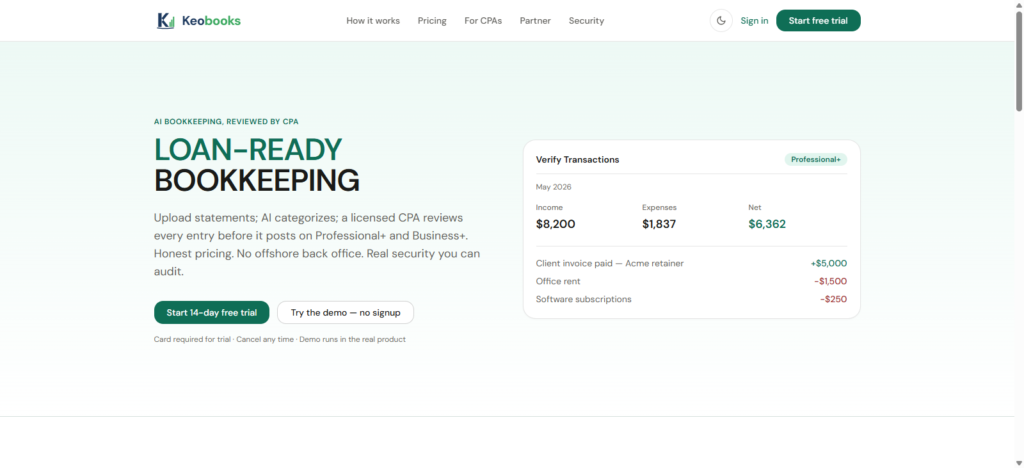
The platform uses AI to classify documents and propose journal entries, helping reduce repetitive bookkeeping work. But on Professional+ and Business+, a US-licensed CPA reviews every entry before it posts.
That gives businesses an alternative to choosing between two extremes:
Traditional bookkeeping: lots of manual work.
AI-only bookkeeping: maximum automation but limited human oversight.
With KEOBOOKS, the idea is straightforward:
Let AI do the repetitive work. Let a qualified professional review the books.
For a growing small business, that can mean spending less time dealing with bookkeeping while still having confidence that someone qualified is looking at the numbers.
Final Thoughts
The most important thing to remember when choosing AI bookkeeping software is that AI itself isn’t the product you’re buying.
You’re buying a better way to manage your finances.
The best solution should reduce repetitive work, keep your records organized, make financial information easier to understand, and give you enough control to review what the software is doing.
Look for strong transaction categorization, document processing, reconciliation, reporting, security, auditability, accountant collaboration, and transparent human oversight.
And don’t be distracted by a long list of AI features.
Ask a much simpler question:
Will this software make my bookkeeping easier, more reliable, and easier to review?
For businesses looking for that balance, KEOBOOKS offers an AI-augmented approach where automation handles routine bookkeeping work while CPA review provides an additional layer of professional oversight on its higher-tier plan)
As AI continues to change the accounting industry, the winners won’t necessarily be the businesses that automate everything.
They’ll be the businesses that automate the right things while keeping humans in control of the decisions that matter.
One thought on “What to Look for in AI Bookkeeping Software”