KEOBOOKS vs QuickBooks: Which Is Better for Small Businesses?
Choosing bookkeeping software is one of those decisions that seems simple until you actually start comparing your options.
At first, you might think you just need somewhere to record income and expenses. Then you start looking at bank feeds, invoicing, reconciliations, financial reports, payroll, integrations, user permissions, automation, and accounting support.
Two names you may encounter are KEOBOOKS and QuickBooks.
QuickBooks has been a familiar name in small-business accounting for years, offering a broad ecosystem of accounting, payments, payroll, time tracking, inventory, and other business tools. Its current QuickBooks Online lineup ranges from Simple Start through Advanced, with features such as automated bookkeeping, bank feeds, invoicing, reporting, reconciliation, inventory, project profitability, and AI-powered capabilities depending on the plan.
KEOBOOKS takes a different approach. Rather than trying to be an enormous all-in-one business platform, it focuses on AI-augmented bookkeeping with CPA review. On its Professional+ and Business+ plans, transactions categorized and proposed by AI are reviewed by a US-licensed CPA before they post.
So which is better?
The honest answer is: it depends on what you want your bookkeeping software to do.
If you want a broad accounting ecosystem with a large selection of business features and integrations, QuickBooks may be the better fit.
If your priority is getting your books organized with AI assistance while having real CPA oversight built into the bookkeeping process, KEOBOOKS may be worth a closer look.
Let’s compare the two.
KEOBOOKS vs QuickBooks at a Glance
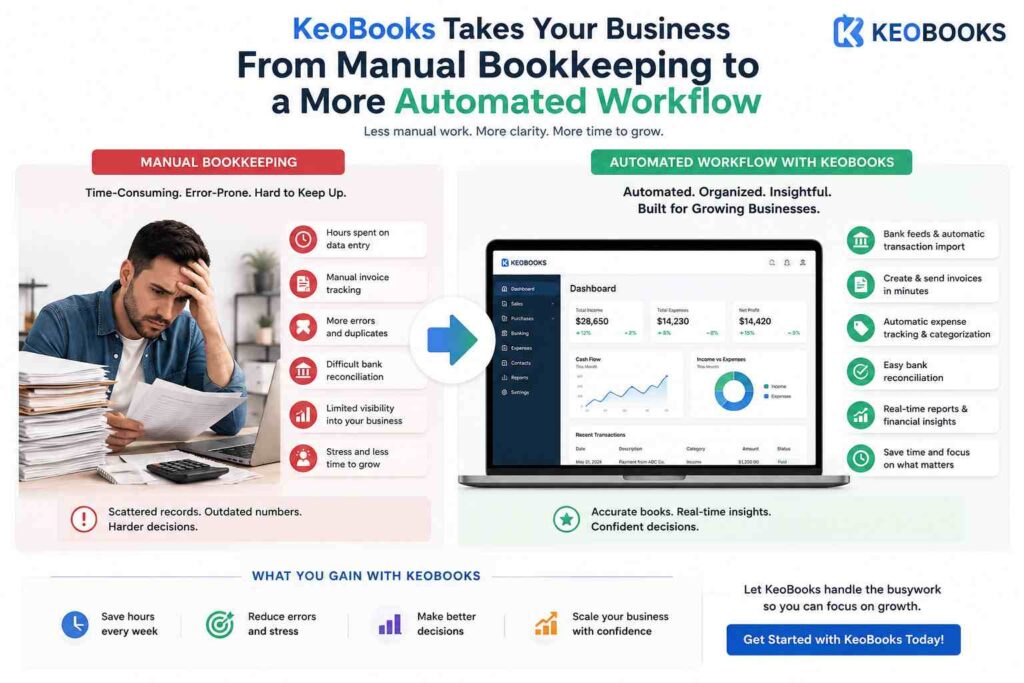
Before getting into the details, here’s the basic difference:
| KEOBOOKS | QuickBooks Online | |
|---|---|---|
| Primary focus | AI-augmented bookkeeping | Broad small-business accounting platform |
| AI bookkeeping | Yes | Yes |
| Human CPA review | Yes, on Professional+ and Business+ | Available through separate services/options |
| Bank connections | US bank statement automation | Bank feeds |
| Invoicing | Yes | Yes |
| Financial reports | Yes | Yes |
| Accountant collaboration | Yes | Yes |
| Dedicated CPA | Business+ | Separate service |
| Best suited for | Businesses wanting bookkeeping + CPA oversight | Businesses wanting a broad accounting ecosystem |
The important thing is that these aren’t necessarily two identical products competing feature-for-feature.
They’re built around somewhat different philosophies.
What Is QuickBooks?
QuickBooks is accounting software from Intuit designed to help businesses manage their finances.
QuickBooks Online offers multiple plans for small businesses, with functionality expanding as you move up the pricing tiers. Current features include income and expense tracking, bank connections, invoicing, financial reports, automated bookkeeping, bill management, multi-currency support, inventory, project profitability, budgeting, and more depending on the plan.
QuickBooks has also been adding more AI-powered functionality. Its current product includes features such as AI-assisted expense categorization, automated bookkeeping, AI-powered insights, reconciliation, anomaly detection, and other intelligent workflows depending on the subscription.
That breadth is one of QuickBooks’ biggest advantages.
For businesses that want accounting software capable of doing much more than basic bookkeeping, the ecosystem can be attractive.
What Is KEOBOOKS?
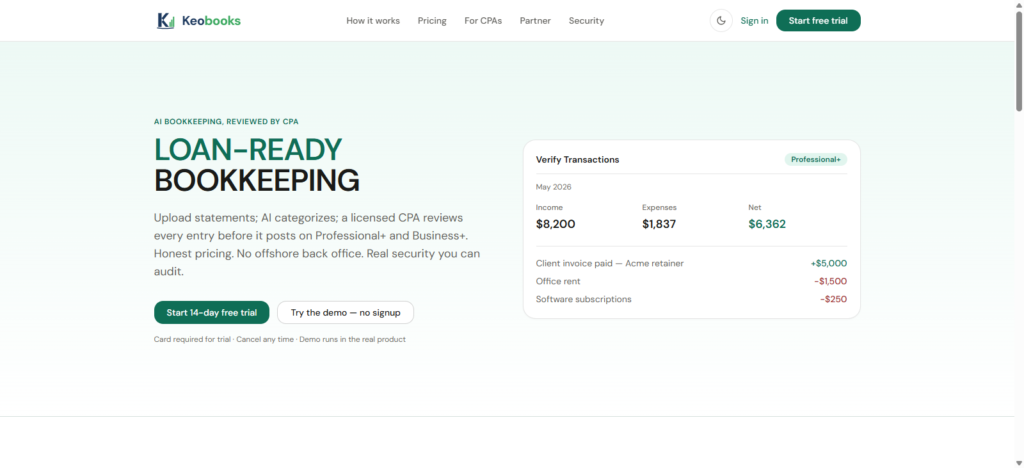
KEOBOOKS approaches bookkeeping from a different angle.
Its central proposition is AI bookkeeping reviewed by a real CPA.
According to KEOBOOKS, its AI can classify financial documents and propose journal entries. On the Professional+ and Business+ plans, a US-licensed CPA reviews every entry before it posts.
That’s an important distinction.
Many businesses want automation because they don’t want to spend hours entering and categorizing transactions. But they also don’t necessarily want their financial records handled entirely by an automated system.
KEOBOOKS combines the two:
AI handles the repetitive work. A real CPA provides review and oversight.
The Starter plan is AI-only, while Professional+ adds CPA review and Business+ adds a dedicated CPA, tax filing, and API access.
KEOBOOKS vs QuickBooks: Bookkeeping Automation
Automation is one area where both platforms are moving aggressively.
QuickBooks currently offers automated bookkeeping that learns how you categorize income and expenses and can automatically match and record transactions. Its higher-tier plans add additional AI-powered capabilities such as reconciliation, anomaly detection, and financial insights.
KEOBOOKS also uses AI to reduce manual bookkeeping work.
Its AI classifies documents and proposes journal entries, helping speed up the monthly close. But on its Professional+ and Business+ plans, those entries are reviewed by a real US-licensed CPA before they post.
This creates an interesting distinction.
QuickBooks:
Automation is increasingly embedded throughout a broad accounting platform.
KEOBOOKS:
AI is used specifically to accelerate bookkeeping, with human CPA review built into the higher plans.
For a business owner who wants maximum automation across many areas of their business, QuickBooks may have the advantage.
For an owner who specifically wants AI-assisted bookkeeping with human accounting oversight, KEOBOOKS offers a compelling alternative.
KEOBOOKS vs QuickBooks: Ease of Use
Accounting software can be extremely powerful and still be frustrating if you don’t understand how to use it.
QuickBooks offers a large number of features, which is useful when you need them. However, the breadth of the platform can also mean there’s more to learn.
This isn’t necessarily a criticism. A larger business may actually want that flexibility.
But a small business owner who simply wants clean books may have a different priority.
KEOBOOKS is more focused.
The platform is designed around bookkeeping rather than trying to become the operating system for every part of your business.
That can make the value proposition easier to understand:
Upload your financial information → let AI organize it → have a CPA review it on eligible plans → get cleaner books.
For a small business owner who doesn’t want to become an accounting expert, that simplicity can be attractive.
KEOBOOKS vs QuickBooks: CPA and Bookkeeping Support
This may be the biggest difference between the two approaches.
QuickBooks gives you the software to manage your books, and businesses can invite their accountant or bookkeeper to collaborate. QuickBooks also offers separate expert-assisted services and other professional support options.
KEOBOOKS builds CPA review directly into its Professional+ and Business+ bookkeeping plans.
KEOBOOKS says entries are reviewed by Brickstone & Associates, a US-licensed CPA practice, rather than an anonymous offshore back office.
That distinction matters for business owners who don’t simply want software.
They want confidence that someone qualified is looking at the books.
For those businesses, KEOBOOKS has a particularly strong proposition.
KEOBOOKS vs QuickBooks: Invoicing
Both platforms support invoicing.
QuickBooks allows businesses to create invoices and accept payments, with payment functionality integrated into its broader ecosystem.
KEOBOOKS also includes invoicing as part of its bookkeeping workflow.
The question here isn’t necessarily which platform can create an invoice.
It’s which overall workflow makes more sense for your business.
If you want invoices, payments, accounting, inventory, projects, payroll, and other business functions within one large ecosystem, QuickBooks has an obvious advantage.
If your priority is keeping the bookkeeping process straightforward and connected to your financial records, KEOBOOKS may be the simpler option.
KEOBOOKS vs QuickBooks: Financial Reporting
Financial reports are essential for understanding how your business is performing.
QuickBooks offers a wide range of reports, with more advanced reporting functionality available as you move up the plans. Current QuickBooks plans include reports covering areas such as profit and loss, sales, accounts receivable, accounts payable, inventory, profitability, and other business metrics.
KEOBOOKS also provides financial statements and bookkeeping reports.
Its focus, however, is less about building an enormous reporting ecosystem and more about producing reliable, organized financial records that business owners and accounting professionals can use.
For a small service business that primarily needs accurate books, financial statements, and useful business visibility, that may be enough.
For a company that needs sophisticated management reporting, custom dashboards, project profitability, inventory reporting, and extensive analytics, QuickBooks may offer more depth.
KEOBOOKS vs QuickBooks: Pricing
Pricing is another area where you need to look beyond the advertised monthly subscription.
QuickBooks Online currently has several plans, including Simple Start, Essentials, Plus, and Advanced. Its official pricing page currently lists standard prices of $38, $85, $140, and $340 per month respectively, although promotional offers may temporarily reduce those prices.
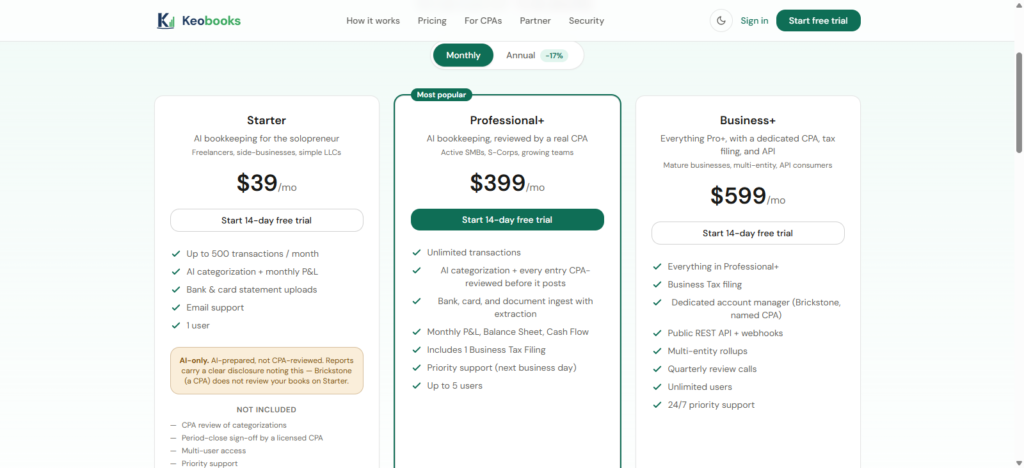
KEOBOOKS uses a much simpler three-tier structure:
- Starter: $39/month
- Professional+: $399/month
- Business+: $599/month
Starter provides AI bookkeeping, while Professional+ adds CPA review and Business+ adds a dedicated CPA, tax filing, and API access.
At first glance, KEOBOOKS’ Professional+ and Business+ plans cost more than basic QuickBooks subscriptions.
But that’s not an apples-to-apples comparison.
You’re comparing software-only accounting functionality with a service that combines AI bookkeeping and professional CPA review.
So the better question is:
What would you otherwise pay for bookkeeping and CPA support on top of your software subscription?
For some businesses, paying more for a combined bookkeeping solution may make more financial sense than buying inexpensive software and then paying separately for professional bookkeeping.
Which Is Better for Small Businesses: KEOBOOKS or QuickBooks?
There’s no single winner.
The better platform depends on what your business actually needs.
Choose QuickBooks If…
QuickBooks may be the better choice if your business needs:
- A broad accounting ecosystem
- Extensive third-party integrations
- Payroll and payments
- Inventory management
- Project profitability
- Advanced reporting
- Multiple users and permissions
- A mature platform with many accounting workflows
QuickBooks’ breadth is its biggest advantage.
It’s designed to accommodate businesses with increasingly sophisticated financial and operational requirements.
Choose KEOBOOKS If…
KEOBOOKS may be a better fit if you want:
- AI-assisted bookkeeping
- Less manual bookkeeping work
- CPA-reviewed books
- A simpler bookkeeping experience
- A US-licensed CPA involved in the process
- A dedicated CPA on Business+
- Bookkeeping and professional oversight in one service
The biggest appeal is the combination of automation and human review.
Instead of choosing between a traditional bookkeeper and an AI-only bookkeeping tool, KEOBOOKS attempts to combine the strengths of both.
What About Businesses That Already Use QuickBooks?
Switching isn’t automatically the right decision.
If QuickBooks is working well for your business, your accountant is comfortable with it, and you’re using its wider ecosystem, there’s no reason to switch simply because another bookkeeping platform exists.
But there are situations where a change may be worth considering.
For example, you may be spending too much time managing the books yourself.
Or perhaps you don’t want to learn increasingly complicated accounting software.
Maybe you’re paying separately for bookkeeping and accounting support and want a more integrated solution.
Or you simply want to know that a qualified CPA is reviewing your books rather than relying entirely on automation.
Those are legitimate reasons to explore alternatives.
KEOBOOKS vs QuickBooks
QuickBooks is a powerful and established accounting platform with a broad range of tools for small and growing businesses. Its current product increasingly incorporates AI, automation, payments, reporting, inventory, project management, and other capabilities.
KEOBOOKS takes a narrower but interesting approach.
Rather than competing primarily on the number of features it offers, KEOBOOKS focuses on making bookkeeping easier through AI while keeping a qualified human involved.
On Professional+ and Business+, a US-licensed CPA reviews every entry before it posts. Business+ also includes a dedicated CPA, tax filing, and API access.
That means the decision ultimately comes down to what you value more.
If you want a broad accounting platform with a huge feature set, QuickBooks is difficult to ignore.
If you want AI-powered bookkeeping with real CPA oversight, KEOBOOKS offers a different approach worth considering.
And for a small business owner, that distinction can matter.
Because the goal of bookkeeping software isn’t simply to give you another place to enter numbers.
It’s to help you maintain reliable financial records without spending your entire week managing them.
KEOBOOKS is built around that idea: let AI handle the repetitive bookkeeping work, while experienced professionals remain involved where human judgment matters.
For businesses that value that balance, it may be worth taking KEOBOOKS for a test drive before deciding which bookkeeping solution is right for them.